Time References
Keep a scene’s When as the date when its main action happens. Add Time References for other periods inside that scene: a remembered fire, a quoted letter, an enacted flashback, or an imagined future.
The screenshots use a synthetic study manuscript, Time Reference Study.
Add references to a scene
Section titled “Add references to a scene”Right-click a scene note and choose Time references…. In the editor, select a passage and choose Add time reference… from the context menu to start with that excerpt. On first use, Enable time reference editing registers the field in your advanced Scene YAML template. Then enter a label, date, and reference kind and click Save reference.
You can also write the list directly in the note’s YAML frontmatter. Quote reference dates, including year-only values:
When: "2026-06-01 17:00"Time References: - Label: "Photograph of the 1952 fire" When: "1952" Kind: recollection Passage: "The photograph: the station fire of 1952 still shaped the decisions being made this week." - Label: "The platform meeting on June 4" When: "2026-06-04" Kind: possibility Passage: "The platform meeting was planned for June 4." - Label: "A departure imagined for 2040" When: "2040" Kind: possibility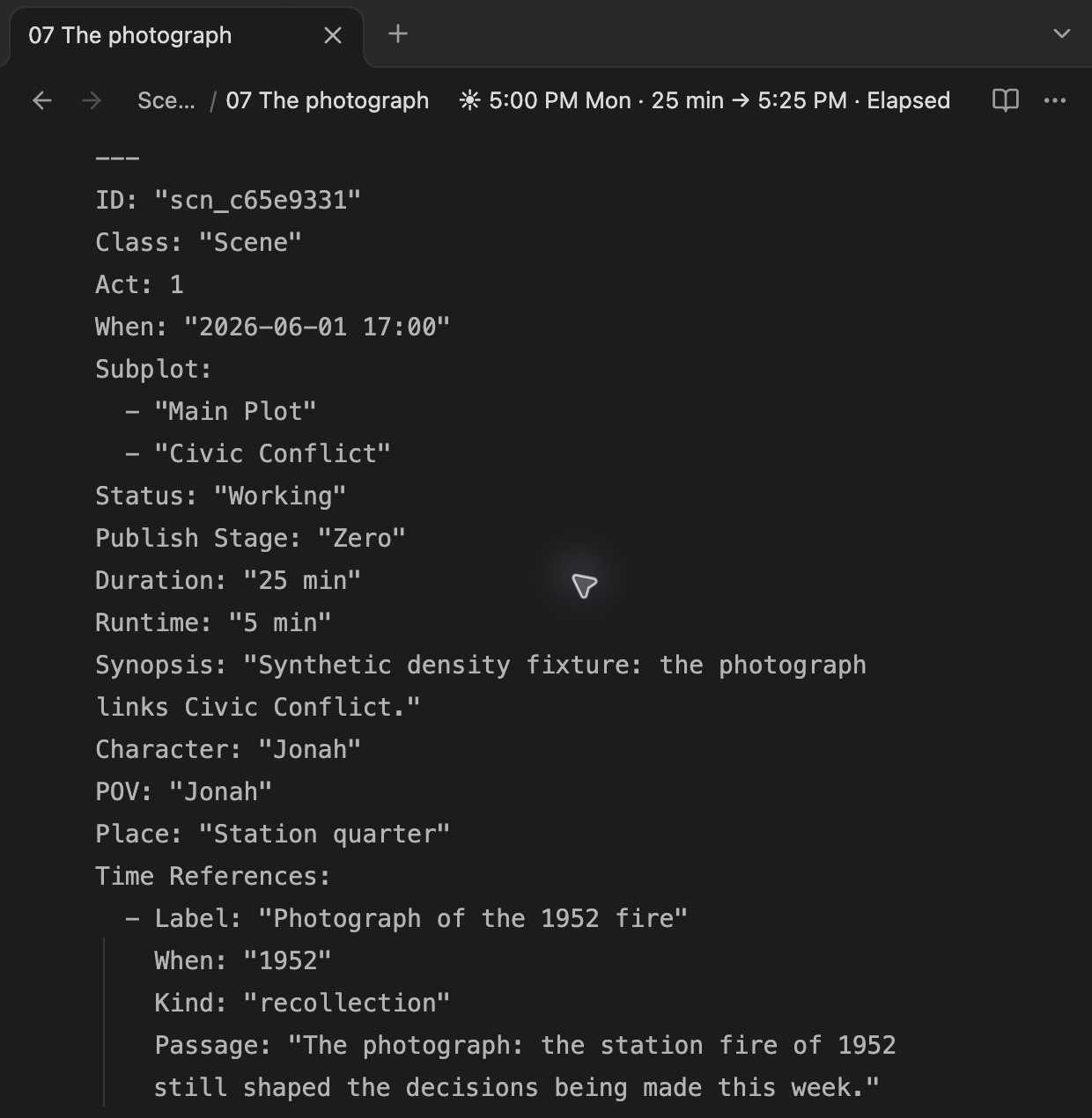
| Field | What to enter |
|---|---|
Label |
A short name for the reference. Required. |
When |
A quoted year, year-month, date, or date and time, such as "1952", "1986-07", "2026-06-04", or "2026-06-04 14:30". Required; the precision you enter is preserved. |
End |
An optional final date for a period, on or after its start. Uses the same date formats. |
Kind |
enacted for action shown in the scene; recollection for a memory; mention for a passing reference; possibility for a possible future. Required. |
Passage |
An optional exact excerpt occurring once in the scene. Clicking the reference opens and highlights it. If the text changes or occurs more than once, edit the reference to reattach it. |
References describe passages within their source scene. They do not create new scenes, change scene counts, move the scene’s primary date, or expand the manuscript’s displayed time range.
Read the timeline
Section titled “Read the timeline”Time-reference marks appear only in normal Chronologue, on the outer All Scenes ring. They disappear in the Shift and Alt (planet calendar) sub-modes, and in other timeline modes. Question icons also hide in these Chronologue sub-modes. A source that belongs to several subplots still has only one set of reference marks.
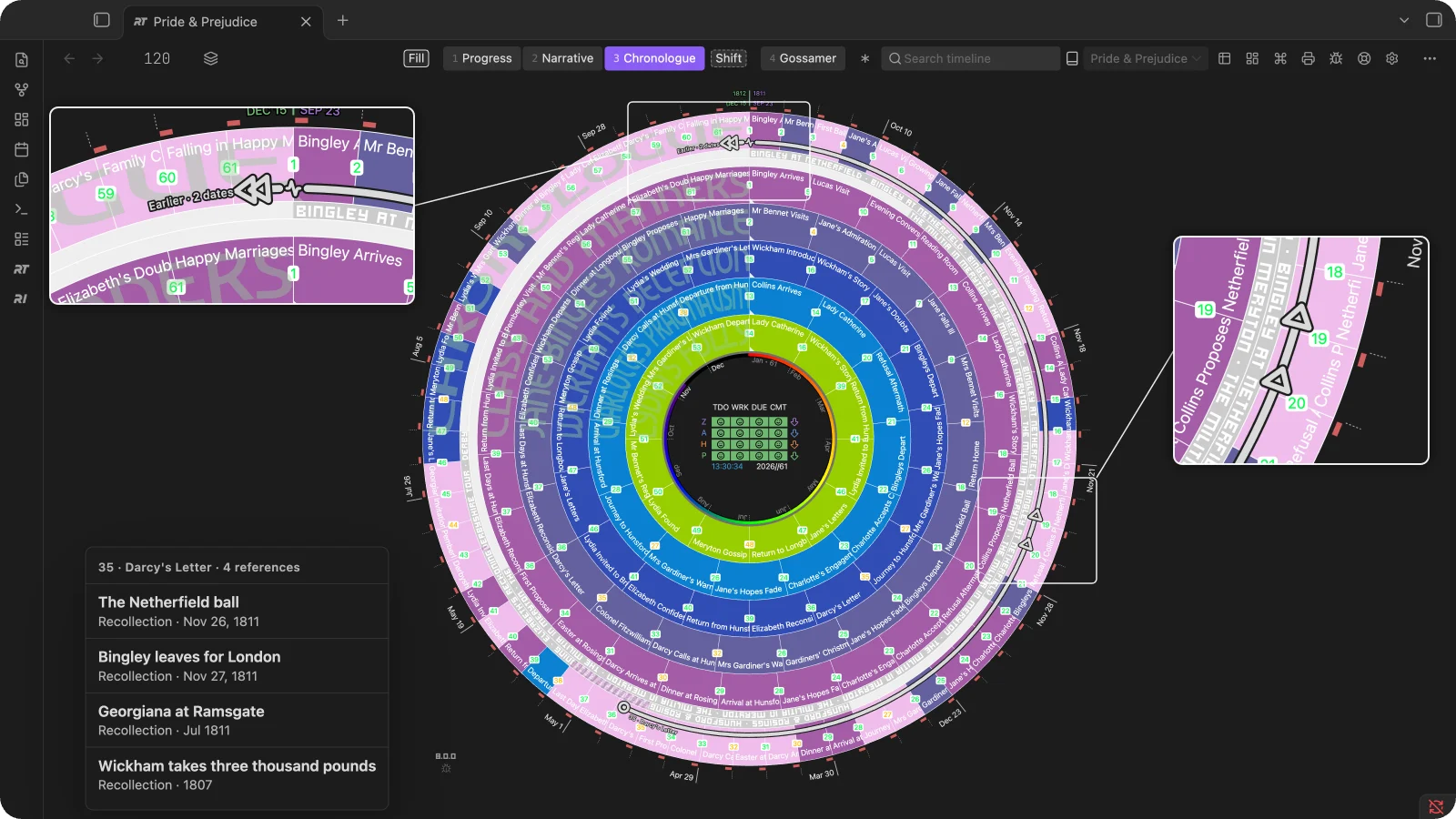
- Source circle: the scene that holds the references. Hover or focus it to see them all at once: every line from the scene draws, its date marks grow, other marks and source circles dim, its rows light in the Timetable, and a list beside the timeline names each reference in the order you wrote them. Click it to choose one from the same list.
- Date mark: a hollow arrowhead on the referenced date, pointing along the ring the way the date lies from its scene: counter-clockwise for an earlier date, clockwise for a later one. A diamond marks references that point both ways, or a span around the scene’s own time. Hover or focus a mark to read its references beside the timeline: the label, kind and date, the source scene and the passage. Click it to open the passage; Radial Timeline scrolls the note to it and highlights it. Where several references share a mark, clicking it lists them to choose from.
- Line: the route from the source circle to the date, drawn in the theme’s text color so it reads over every subplot color. It does not mean that intervening scenes mention that date.
- Earlier / Later: references outside the manuscript’s date range gather on either side of the 12 o’clock seam under a double arrowhead, labeled with how many dates they hold (Earlier · 2 dates). The small activity-shaped break marks the discontinuity. Their distance from the seam does not measure elapsed years.
- Stack and +N: up to three marks appear at a shared date.
+6means six additional reference entries beyond the three shown. Click the count to choose one of those passages. The count concerns references, not years or scenes. - In Chronologue, the timeline legend shows the line and each kind of mark.
Several scenes can refer to the same date. Each reference retains its own source: selecting the June 4 passage in The photograph, for example, connects that scene to June 4; selecting the corresponding passage in The council vote connects that source instead.
Read and edit references in the Timetable
Section titled “Read and edit references in the Timetable”Click the reference control beside a source scene’s number to expand its child rows. Each child shows the label, date or period, and kind. Click a child to select its relationship and open its passage; Manage time references opens the editor.
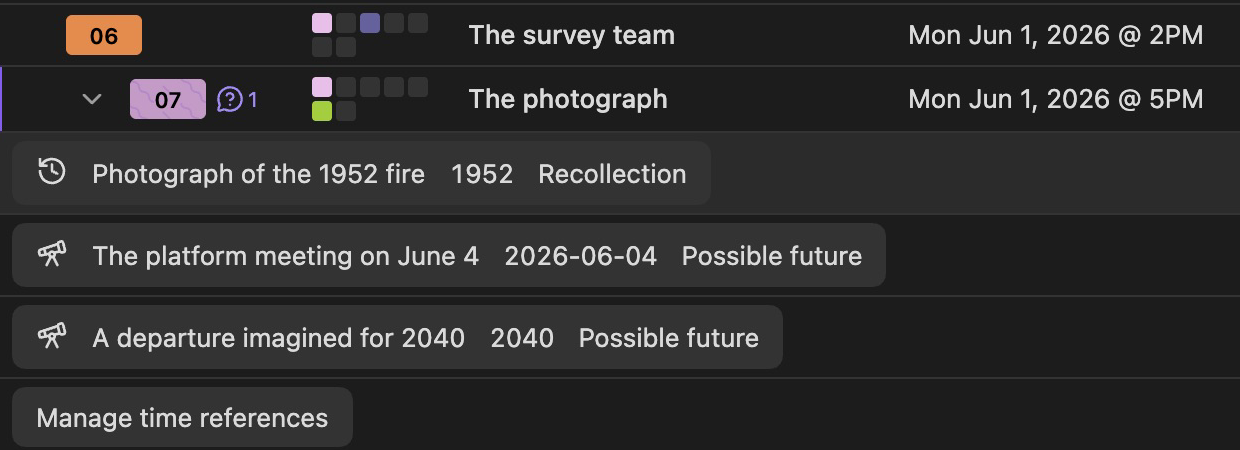
The child rows stay with their source scene rather than becoming separate manuscript scenes. The Timetable’s reference list remains available in other modes for reading and editing; the wheel’s marks return when you switch back to normal Chronologue. Reference dates remain in the Earth calendar, including when the Timetable follows a planetary calendar.
See Chronologue Mode, Timetable, and Scene properties.
Headings set in Kalice, Claude Type, designed by Margot Lévêque.